
IN THIS SEC
- Overview
- Functions
- JOIIN.TB - Trial Balance Report
- JOIIN.TB_ACC_VAL - Get Trial Balance value for specific account
- JOIIN.TB_ACC_LIST - List all Trial Balance Accounts
- JOIIN.PL - Profit & Loss Report
- JOIIN.PL_ACC_VAL - Get Profit & Loss value for specific account
- JOIIN.PL_ACC_LIST - List all Profit & Loss Accounts
- JOIIN.BS - Balance Sheet Report
- JOIIN.BS_ACC_VAL - Get Balance Sheet value for specific account
- JOIIN.BS_ACC_LIST - List all Balance Sheet Accounts
- JOIIN.COMPANIES - List available companies
- Additional Notes on Function Parameters
- Installation
- Troubleshooting
Overview
The Joiin Add-in for Excel is a Microsoft Office Add-in which is available on the Microsoft App Store. This add-in enables you to use Joiin-specific functions directly within Excel to seamlessly work with data from Joiin. For example you can add a formula to a cell in Excel like:
=JOIIN.BS({"Joiin Demo Company"}, "GBP", "2024-01", "2024-12")
and cells will be automatically filled with a Balance Sheet report from your Joiin account, using the specified parameters.
Functions
The functions currently available in Excel Add-In are as below. The list of functions and how to use them (such as what parameters can be supplied) is described in detail in the right-hand Joiin Excel-Add In pane. Clicking on the INSERT button next to each function will automatically insert the function into the currently highlighted cell, with sample parameters - from there you can change.
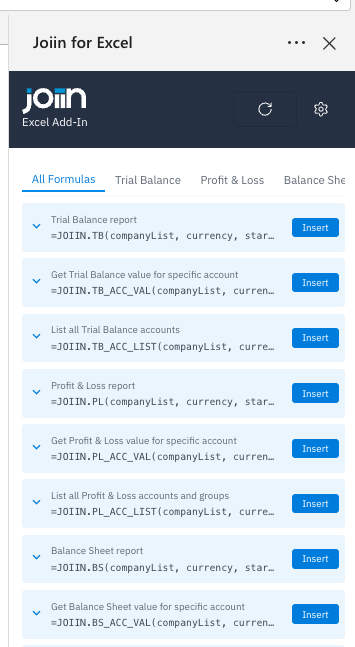
We will be adding features and functions all the time. If you have any requests contact us at support@joiin.co.
JOIIN.TB - Trial Balance Report
=JOIIN.TB(companyList, currency, startDate, endDate)
This function takes the following parameters.
| Parameter | Description |
|---|---|
companyList | The list of companies (names or ids) |
| currency | The reporting currency (ISO code e.g. USD, GBP, EUR) |
| startDate | The reporting start date (e.g. 2024-01) |
| endDate | The reporting end date (e.g. 2024-12) |
| eliminationType | OPTIONAL. The elimination type (eliminate, eliminations-only, or none), if not set defaults to "eliminate" |
| eliminationSet | OPTIONAL. The elimination set to apply (set name or set id), if not set defaults to the default elimination set |
JOIIN.TB_ACC_VAL - Get Trial Balance value for specific account
=JOIIN.TB_ACC_VAL(companyList, currency, startDate, endDate, accountName)
This function takes the following parameters.
| Parameter | Description |
|---|---|
companyList | The list of companies (names or ids) |
| currency | The reporting currency (ISO code e.g. USD, GBP, EUR) |
| startDate | The reporting start date (e.g. 2024-01) |
| endDate | The reporting end date (e.g. 2024-12) |
| accountName | The name of the account |
| eliminationType | OPTIONAL. The elimination type (eliminate, eliminations-only, or none), if not set defaults to "eliminate" |
| eliminationSet | OPTIONAL. The elimination set to apply (set name or set id), if not set defaults to the default elimination set |
JOIIN.TB_ACC_LIST - List all Trial Balance Accounts
=JOIIN.TB_ACC_LIST(companyList, currency, startDate, endDate)
This function takes the following parameters.
| Parameter | Description |
|---|---|
companyList | The list of companies (names or ids) |
| currency | The reporting currency (ISO code e.g. USD, GBP, EUR) |
| startDate | The reporting start date (e.g. 2024-01) |
| endDate | The reporting end date (e.g. 2024-12) |
| eliminationType | OPTIONAL. The elimination type (eliminate, eliminations-only, or none), if not set defaults to "eliminate" |
| eliminationSet | OPTIONAL. The elimination set to apply (set name or set id), if not set defaults to the default elimination set |
JOIIN.PL - Profit & Loss Report
=JOIIN.PL(companyList, currency, startDate, endDate)
This function takes the following parameters.
| Parameter | Description |
|---|---|
companyList | The list of companies (names or ids) |
| currency | The reporting currency (ISO code e.g. USD, GBP, EUR) |
| startDate | The reporting start date (e.g. 2024-01) |
| endDate | The reporting end date (e.g. 2024-12) |
| eliminationType | OPTIONAL. The elimination type (eliminate, eliminations-only, or none), if not set defaults to "eliminate" |
| eliminationSet | OPTIONAL. The elimination set to apply (set name or set id), if not set defaults to the default elimination set |
| categoryName | OPTIONAL. The name of the category to filter the report by |
| categoryOptionNames | OPTIONAL. The names of the category options to filter the report by. |
JOIIN.PL_ACC_VAL - Get Profit & Loss value for specific account
=JOIIN.PL_ACC_VAL(companyList, currency, startDate, endDate, accountName)
This function takes the following parameters.
| Parameter | Description |
|---|---|
companyList | The list of companies (names or ids) |
| currency | The reporting currency (ISO code e.g. USD, GBP, EUR) |
| startDate | The reporting start date (e.g. 2024-01) |
| endDate | The reporting end date (e.g. 2024-12) |
| accountName | The name of the account |
| valueType | OPTIONAL. Type of value returned: Actual or Budget, default is Actual |
| eliminationType | OPTIONAL. The elimination type (eliminate, eliminations-only, or none), if not set defaults to "eliminate" |
| eliminationSet | OPTIONAL. The elimination set to apply (set name or set id), if not set defaults to the default elimination set |
| categoryName | OPTIONAL. The name of the category to filter the report by |
| categoryOptionNames | OPTIONAL. The names of the category options to filter the report by. |
JOIIN.PL_ACC_LIST - List all Profit & Loss Accounts
=JOIIN.PL_ACC_LIST(companyList, currency, startDate, endDate)
This function takes the following parameters.
| Parameter | Description |
|---|---|
companyList | The list of companies (names or ids) |
| currency | The reporting currency (ISO code e.g. USD, GBP, EUR) |
| startDate | The reporting start date (e.g. 2024-01) |
| endDate | The reporting end date (e.g. 2024-12) |
| groupNameFilter | OPTIONAL. Limit accounts to only those within the group with this name. |
| eliminationType | OPTIONAL. The elimination type (eliminate, eliminations-only, or none), if not set defaults to "eliminate" |
| eliminationSet | OPTIONAL. The elimination set to apply (set name or set id), if not set defaults to the default elimination set |
JOIIN.BS - Balance Sheet Report
=JOIIN.BS(companyList, currency, startDate, endDate)
This function takes the following parameters.
| Parameter | Description |
|---|---|
companyList | The list of companies (names or ids) |
| currency | The reporting currency (ISO code e.g. USD, GBP, EUR) |
| startDate | The reporting start date (e.g. 2024-01) |
| endDate | The reporting end date (e.g. 2024-12) |
| eliminationType | OPTIONAL. The elimination type (eliminate, eliminations-only, or none), if not set defaults to "eliminate" |
| eliminationSet | OPTIONAL. The elimination set to apply (set name or set id), if not set defaults to the default elimination set |
JOIIN.BS_ACC_VAL - Get Balance Sheet value for specific account
=JOIIN.BS_ACC_VAL(companyList, currency, startDate, endDate, accountName)
This function takes the following parameters.
| Parameter | Description |
|---|---|
companyList | The list of companies (names or ids) |
| currency | The reporting currency (ISO code e.g. USD, GBP, EUR) |
| startDate | The reporting start date (e.g. 2024-01) |
| endDate | The reporting end date (e.g. 2024-12) |
| accountName | The name of the account |
| valueType | OPTIONAL. Type of value returned: Actual or Budget, default is Actual |
| eliminationType | OPTIONAL. The elimination type (eliminate, eliminations-only, or none), if not set defaults to "eliminate" |
| eliminationSet | OPTIONAL. The elimination set to apply (set name or set id), if not set defaults to the default elimination set |
JOIIN.BS_ACC_LIST - List all Balance Sheet Accounts
=JOIIN.BS_ACC_LIST(companyList, currency, startDate, endDate)
This function takes the following parameters.
| Parameter | Description |
|---|---|
companyList | The list of companies (names or ids) |
| currency | The reporting currency (ISO code e.g. USD, GBP, EUR) |
| startDate | The reporting start date (e.g. 2024-01) |
| endDate | The reporting end date (e.g. 2024-12) |
| groupNameFilter | OPTIONAL. Limit accounts to only those within the group with this name. |
| eliminationType | OPTIONAL. The elimination type (eliminate, eliminations-only, or none), if not set defaults to "eliminate" |
| eliminationSet | OPTIONAL. The elimination set to apply (set name or set id), if not set defaults to the default elimination set |
JOIIN.COMPANIES - List available companies
=JOIIN.COMPANIES()
This function takes the following parameters.
| Parameter | Description |
|---|---|
filter | OPTIONAL. Filter companies by name. |
Additional Notes on Function Parameters
Budget Behaviour
If you specify valueType parameter to be Budget then budget values will be pulled instead of actuals.
The budget values returned will be the aggregated total of every budget currently toggled ON in the Joiin Budgets page. This is the same as selecting All Enabled Budgets option when running a report in Joiin - see the Budgets article for more information.
Elimination Behaviour
You can control how eliminations are treated on some of the functions using the eliminationType and eliminationSet parameters.
Default Elimination Behaviour: In the absence of specified elimination parameters, all functions execute the same default elimination logic:
- eliminationType: "eliminate"
- eliminationSet: Default elimination set
Specifying Multiple Values
Some function parameters allow multiple values to be entered, e.g. companyList or categoryOptionNames.
To specify multiple parameters in a function you must separate them by commas and enclose them in curly braces as in the example below:
=JOIIN.PL_ACC_VAL ( {"Bestco Ltd", "Amco Industries"}, "GBP", "2025-01", "2025-12", "Sales", "Actual")
Parameter Order
Parameters must be in the exact order shown in the metadata
Skipping Optional Parameters
If you to specify only some of the optional parameter, you can use empty commas `,,` to skip optional parameters while providing later ones.
Account Lists and Spilling
The list functions — JOIIN.TB_ACC_LIST, JOIIN.PL_ACC_LIST and JOIIN.BS_ACC_LIST — return an array of accounts that spills down the column from the cell holding the formula. Excel needs that space to be empty. If anything is in the way, the formula returns #SPILL! instead of your accounts.
Your account list will grow over time as accounts are added in your accounting system, so leave more room below the formula than the list currently needs:
| =JOIIN.BS_ACC_LIST(...) |
| Account 1               |
| Account 2               |
| Account 3               |
|                         | ← keep clear
|                         | ← keep clear
| Your data here          |
If you see #SPILL!, move any data or formulas below the list further down. Where a list feeds other calculations, reference it from a separate sheet or well below the expected range rather than immediately underneath.
Breaking Links
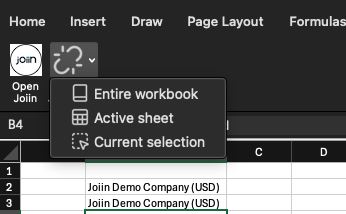
You can use the Break Links button on the Joiin ribbon toolbar to break links with the Joiin formulas and replace with static values. This is useful if you wish to share your spreadsheet with another person who does not have the Joiin Add-In or access to Joiin. Simply click on the button and select the scope of the area you wish to break the links on.
Installation
The Excel Add-In can be installed via the Integrations menu item at the bottom of the main left menu. Click on the Integrations menu item then select the Excel Add-In tab to bring up the installation page.
Choose one of the options in the Excel Add-In section to install the Add-in - you can choose to install it on Desktop Excel or Excel Online. Click on the desired option to start the installation procedures.
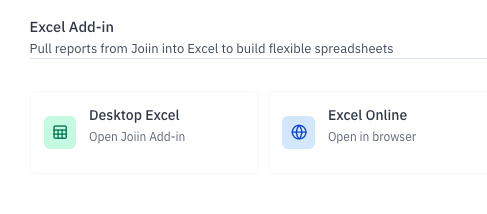
Follow the on-screen procedures to install the Add-in. Once installed you will see an additional tab at the top for the Joiin add-in. Click on this any time to access the Joiin Add-in app which will appear on the right-hand side..
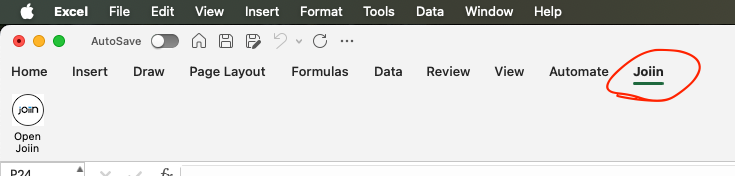
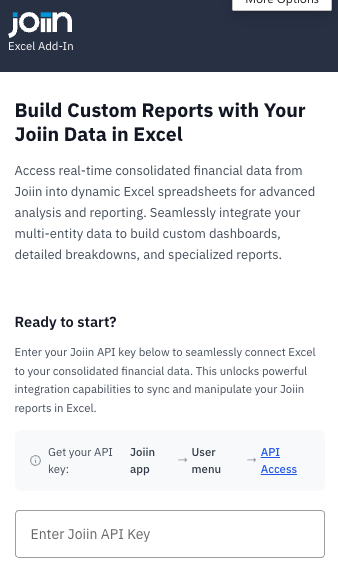
The add-in to the right will display the start screen. Now you must install an API key to get up and running.
Installing Keys
Once installed you have to enter an API key to get up and running. Your API key can be found by logging onto Joiin and navigating to the Integration menu item, then selecting the Excel Add-In tab (or follow the link in the add-in start screen).
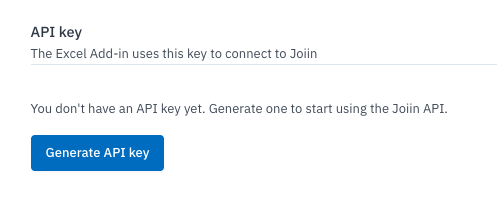
If you do not already have an API key click on the Generate API Key button to generate one. A key will be generated and validated.
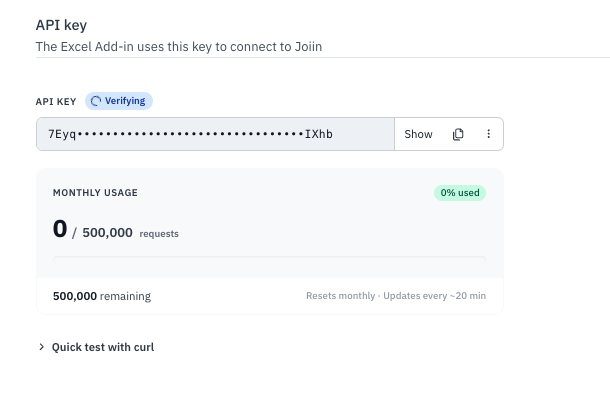
Copy the key to your clipboard by clicking on the copy icon. Then paste this key into API Key field of the Excel Add-In start screen. Click on Connect and Start Building and you are ready to go.
You will see a list of available formulas which can be used to pull Joiin data into Excel.
Adding/Changing Keys
If you are running a multi-client Joiin environment - or if you need to switch Joiin accounts - you can add additional keys by clicking on the cog icon at the top righ.
There you can add another API key by clicking on Add API Key - or you can edit or delete existing keys.
See the Joiin Add-In on the Microsoft Store here.
Troubleshooting
⚠️ Update to Joiin Excel formulas (important)
Changes to P&L by Category
In September 2026 we made two changes to how JOIIN.PL and JOIIN.PL_ACC_VAL return data when you use the categoryName and categoryOptionNames parameters.
Options with no data now return 0
Previously, if a category option had no activity in your selected period, the cell returned nothing. Now it returns 0.
Example: you have a "Contract D" option that was dormant in January.
Before:
| Contract A | 12,400 |
| Contract B |  8,150 |
| Contract C |  3,900 |
| Contract D |        | ← blank
After:
| Contract A | 12,400 |
| Contract B |  8,150 |
| Contract C |  3,900 |
| Contract D |      0 | ← now returns zero
Totals and SUMs are unaffected. But if you have formulas that treat a blank as "no activity" — a COUNT, an ISBLANK check, or a divisor guard — review those and test for zero instead.
Mistyped option names now show an error
Option names are matched ignoring capitalisation and extra spaces, so "north region" and "North Region " both find North Region. If a name doesn't match any option in your category, the cell now returns:
Category Option X not foundPreviously a mismatch could return a blank or a misleading figure. If you see this on a formula that appeared to work before, check the option name against your category options in Joiin.
Error Running Add-In
If you see an error like the one below when you first try to run the Add-In it could be for a number of reasons.
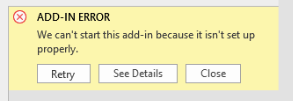
Things to check:
Errors like this are often caused by PC or network restrictions. Check if there is a firewall or IT policy that could be blocking traffic to Joiin's API.
If you’re part of an enterprise setup, it’s also possible that certain limits have been placed on Excel add-ins.
It is worth checking with your IT team to see if any of this applies.
Very large workbooks
If a workbook fetches thousands of values in a single refresh, some cells may show #VALUE! even though Joiin is working normally — Excel can only handle so many simultaneous requests from your machine.
Once a cell has failed this way, Excel doesn't retry it for the rest of the session, so refreshing again appears to do nothing. Closing and reopening Excel resets it.
Large refreshes also use more of your monthly API request allowance. If you're hitting limits, get in touch at support@joiin.co and we can look at your workbook with you.
Removing the Add-In
If you wish to remove the Joiin Add-In from Excel follow these instructions. Instructions may vary depending on the version of Excel. We will add instructions for other Excel versions in the future.
Excel Desktop Version on Mac
- Insert -> Add-Ins -> My Add-Ins
- Click on three dots at top right of Joiin Add-In and select Remove.